
Citation Finder
Paste a paragraph and get real, peer-reviewed sources for every claim in it — each one a paper you can open and check.
What is a Citation Finder?
A Citation Finder is a tool that reads a passage of your writing and locates real, peer-reviewed sources for the claims inside it. You paste a paragraph, a literature review, or a whole chapter; the Citation Finder parses each statement that needs support, searches the major academic databases, and returns matching papers ranked by how directly they back that specific assertion.
The difference between a Citation Finder and an ordinary search engine is the unit of work. A search engine answers a query you have to invent yourself. It starts instead from the sentence you already wrote, works out what would count as evidence for it, and searches on your behalf. Every result comes back with a live DOI or publisher link, so you can open the paper and judge it yourself.
How the Citation Finder works
Three stages run for every request. Nothing is generated: the Citation Finder only returns records that exist in the databases it queries.
- 1
Split the text into claims
An AI pass segments your text into self-contained claims. In Segment mode each idea is searched separately, so a paragraph covering three topics returns three independent result sets. In Whole mode the Citation Finder treats the passage as one topic — useful when the whole paragraph argues a single point.
- 2
Search the literature in parallel
For each claim, the Citation Finder derives search terms and queries arXiv, Crossref, OpenAlex, PubMed and Google Scholar at the same time. Querying several databases at once matters: coverage differs sharply by discipline, and a paper missing from one index is often present in another.
- 3
Rank by how well each source supports the claim
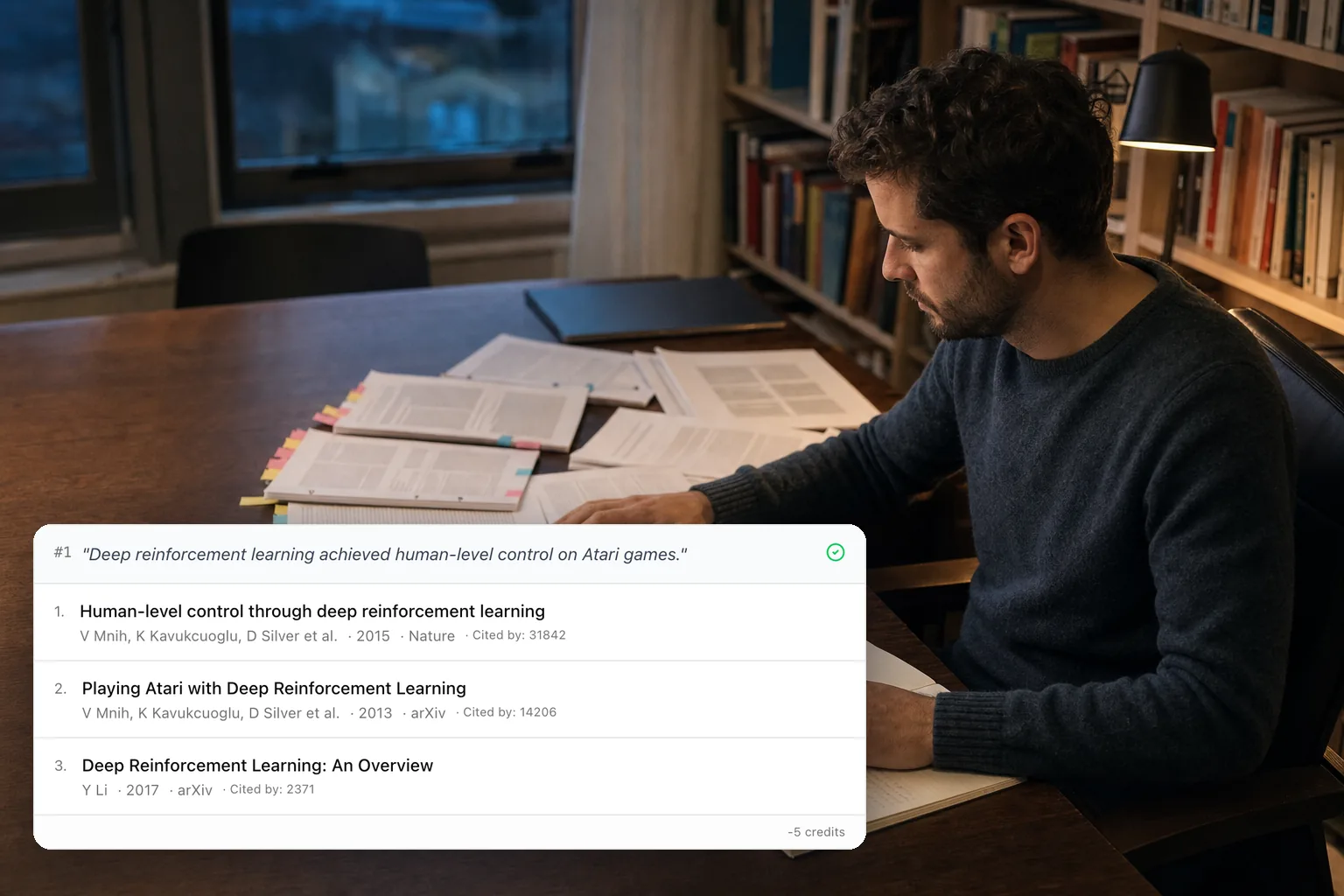
Results are ranked on topical relevance, citation strength and how directly the paper supports your specific sentence — not on keyword overlap alone. The Citation Finder shows authors, year, venue and citation count for each hit so you can judge fit before opening anything.
When to use the Citation Finder
Writing a first draft
You know what you want to argue but not who has already shown it. Draft the paragraph first, then run it through the Citation Finder and attach evidence to each claim.
Filling gaps flagged in review
A supervisor or reviewer marks a sentence "needs a citation". Paste that sentence into the Citation Finder and get candidate sources in seconds instead of rebuilding the search by hand.
Starting a literature review
Paste your working summary of a field. The Citation Finder returns the papers behind each strand, which is a faster way into an unfamiliar area than guessing at search terms.
Replacing a citation you cannot verify
A reference turns out to be fabricated or unfindable. Feed the claim it was supporting to the Citation Finder and find a real paper that makes the same point.

Citation Finder examples
Two short examples of what goes in and what comes back.
Your sentence
Deep reinforcement learning achieved human-level control on Atari games.
What the Citation Finder returns
Mnih et al., "Human-level control through deep reinforcement learning", Nature 2015 — plus the earlier "Playing Atari with Deep Reinforcement Learning" preprint and two reviews, each with a working link.
Your paragraph
Transformer architectures have become the dominant approach for natural language processing. Separately, contrastive pre-training changed how vision models are trained.
What the Citation Finder returns
Two independent result sets — Vaswani et al. and follow-up surveys for the first claim, Radford et al. and related work for the second — because Segment mode searched each idea on its own.
Why finding citations by hand is the slow part
- Hunting for references is the slowest stage of academic writing. Researchers routinely lose hours scrolling Google Scholar for one defensible source, then settle for whatever appeared on page one.
- General-purpose chatbots make this worse. Asked to suggest citations, they invent plausible papers with real-sounding authors and dead DOIs. A Citation Finder that searches actual databases cannot do this, because it only returns records it found.
- Database coverage is uneven. PubMed is strong in medicine and thin elsewhere; arXiv covers preprints that Crossref will not have for months. Searching one index at a time quietly hides work that exists.
- Wrong or missing citations carry real cost — rejected submissions, academic-integrity reviews, and corrections that follow a paper for years.
What the Citation Finder gives you
- Real papers only. Every result is a record retrieved from an academic database, with a link you can open. The Citation Finder never generates a reference.
- Five sources searched at once — arXiv, Crossref, OpenAlex, PubMed and Google Scholar — so discipline coverage gaps do not silently cost you a paper.
- Claim-level results. Each segment gets its own ranked list, so you know which source supports which sentence rather than receiving one undifferentiated pile.
- Export to CSV, PDF or BibTeX in eight citation styles, so what the Citation Finder found goes straight into your reference manager.
Citation Finder FAQ
- Is the Citation Finder free?
- Yes. Every account gets a daily free allowance of credits, and one Citation Finder search costs 5 credits. No card is needed to start.
- Can the Citation Finder invent a source?
- No. It returns only records retrieved from the databases it queries, each with its own link. If nothing matches a claim, it says so rather than filling the gap.
- Which databases does the Citation Finder search?
- arXiv, Crossref, OpenAlex, PubMed and Google Scholar, queried in parallel for every claim.
- What is the difference between Segment and Whole mode?
- Segment mode splits your text into separate claims and searches each one independently. Whole mode treats the entire passage as a single topic. Use Segment for multi-topic paragraphs and Whole for a single focused argument.
- Does it work outside English?
- The interface runs in 11 languages and the Citation Finder handles non-English input, though coverage in the underlying databases is strongest for English-language literature.
- How is this different from the Citation Checker?
- Opposite directions. The Citation Finder starts from a claim and finds sources for it. The Citation Checker starts from references you already have and verifies each one against the same databases.