
AI Humanizer · Academic Writing · AI Detection
How to Humanize AI-Generated Text Without Losing a Single Citation
A step-by-step guide to rewriting GPT, Claude or Gemini drafts so they read like a person wrote them, with every fact, number and citation left intact.
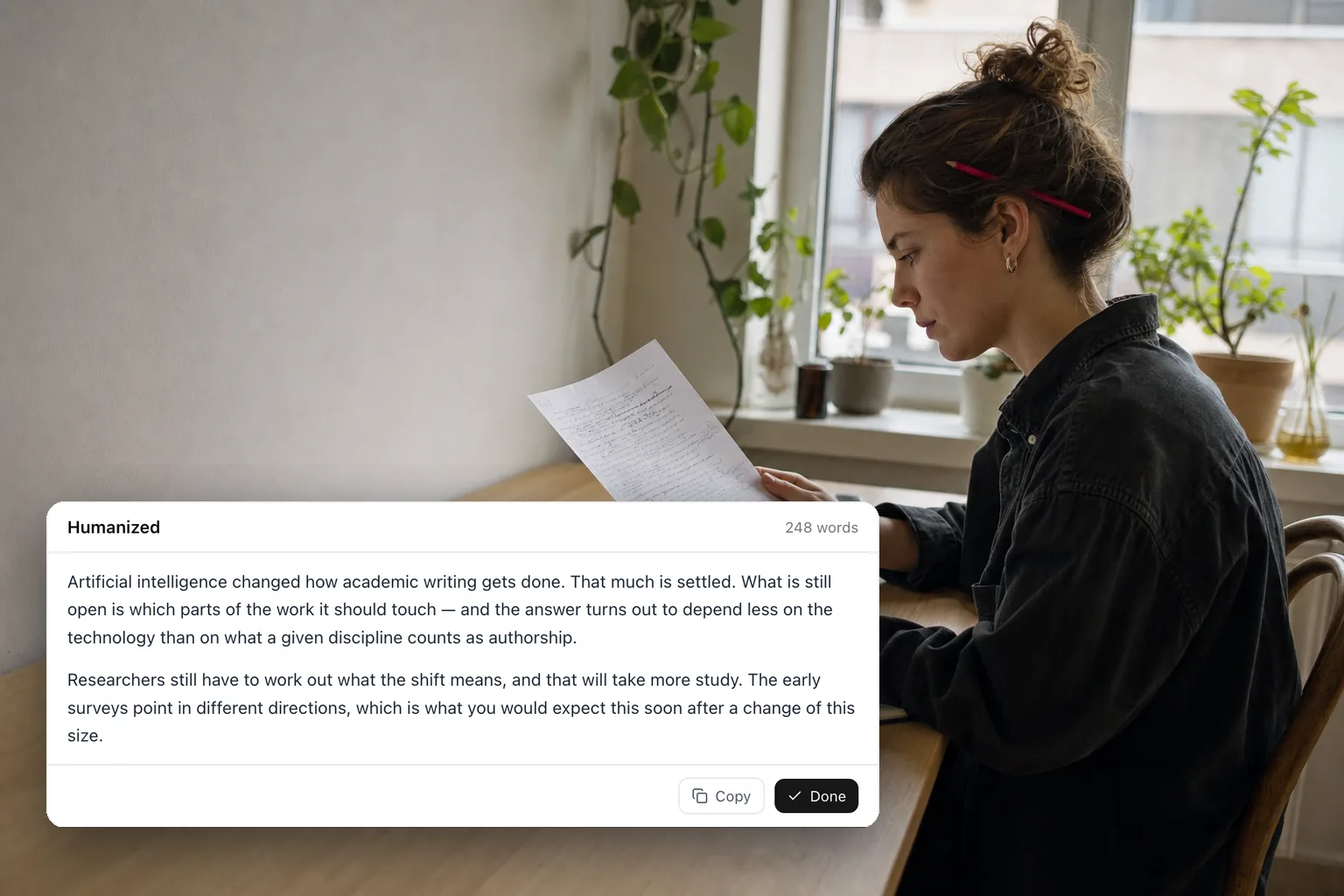
Most people who use a language model to draft a paragraph run into the same problem a minute later: the paragraph is correct, complete, and unmistakably not theirs. It has a rhythm you can hear from across the room. Fixing that by hand is slow, and it is surprisingly easy to lose a number or a reference while you reshape a sentence. This guide covers what an AI humanizer should change, what it must never touch, and a workflow for getting a GPT, Claude or Gemini draft into your own voice with the facts and citations intact.
Why AI drafts read like AI
Model output is not bad prose. It is flat prose, and flatness has a small number of causes that show up in almost every draft.
Uniform sentence length. Human writing swings between short and long. Model writing settles at a comfortable medium and stays there, so every clause lands with the same weight and nothing stands out. Read a page aloud and the problem is audible.
Stock connectives. “Moreover”, “Furthermore”, “Additionally” and “It is important to note that” open sentence after sentence. They signal structure without adding meaning.
Abstraction stacks. “The multifaceted landscape of academic writing has been fundamentally transformed” says less than “Academic writing has changed”, and takes twice as long to say it. Words like delve, navigate, landscape, testament and paradigm cluster in model drafts far more often than in human ones.
Reflexive hedging. Every claim arrives wrapped in “it could be argued that” or “in many cases”. Academic prose does need hedging, but only where the evidence is uncertain, not as a tic.
Here is the same sentence before and after a humanizer pass:
AI draft: It is important to note that, in today’s fast-paced world, the utilization of artificial intelligence has fundamentally transformed the multifaceted landscape of academic writing.
Humanized: Artificial intelligence has changed how academic writing gets done.
The claim is identical. The filler opener, the abstraction stack and the padding are gone.
What a humanizer must never change
This is the part most rewriting tools get wrong, and it is the part that matters most in academic work. A rewrite is only useful if the substance survives it. The table below is the contract the CiteTrue AI Humanizer is built around.
| Changes | Stays exactly as written |
|---|---|
| Sentence rhythm and length | Facts, figures and statistics |
| Word choice and connectives | Inline citations, reference numbers and DOIs |
| Sentence construction | Proper nouns, author names and titles |
| Register (school essay vs. PhD thesis) | Domain terminology and code identifiers |
| Paragraph flow | Paragraph breaks, bullet lists and numbered lists |
| The language of the input |
The two lines that deserve the most attention are citations and numbers. A rewrite that turns “(Smith et al., 2021)” into “(Smith, 2021)” or rounds “37.4%” to “nearly 40%” has quietly falsified your work. Whatever tool you use, check those two categories against the original before you move on.
A five-step workflow
1. Pick the register before you paste
Decide who the text is for. A humanizer that lets you choose a writing level (General, High School, Undergraduate, Master’s or PhD) will set vocabulary and hedging to match, so an undergraduate essay does not come back sounding like a grant application and a thesis section does not come back sounding like a blog post. Getting this right up front saves a second pass.
2. Work in sections, not whole documents
Even with a 40,000-character limit per run, a chapter is better handled section by section. Each pass then covers one part of the argument, the output is easier to compare against the input, and a problem in one section does not force you to redo the rest. Paragraph breaks and lists survive the rewrite, so the result pastes straight back into your document.
3. Read the rewrite against the original
Put the two versions side by side and read the new one once for sense and once for substance. On the substance pass you are looking for exactly three things: a number that changed, a citation that moved or disappeared, and a claim that was not in the original. A tool that streams the rewrite as it is written makes this easier, because you can start reading before it finishes.
4. Re-verify the references
Humanizing does not touch what a citation points to, but the draft you started from may already contain references that do not exist. Chatbots invent plausible-looking papers with real-sounding authors and dead DOIs. Run the finished reference list through a citation checker that resolves each entry against Crossref, OpenAlex, PubMed and the publisher databases, and fix anything that comes back as not found. If you are still gathering sources, Paper Draft works the other way round: it retrieves real papers first and only lets the text cite from that list.
5. Put your own voice back
A humanizer removes the machine’s fingerprints. It cannot add yours. Read the final text one more time and change anything that still sounds more like the tool than like you. The ideas were yours to begin with; this is the step where the phrasing catches up.
How the CiteTrue AI Humanizer handles this
The AI Humanizer was built for academic drafts specifically, which is why the preservation rules above are hard constraints rather than suggestions:
- Five writing levels, from General to PhD, set the register before you start.
- Up to 40,000 characters per run, streamed back token by token so you can read as it writes.
- Nothing is added. The tool is instructed never to introduce a claim, a statistic or a source that was not in your input, and to leave inline citations, DOIs and proper nouns exactly as written.
- Structure survives. Paragraph breaks, bullets and numbered lists come back in the same shape.
- Your language stays your language. Chinese or German input comes back in Chinese or German, and the interface runs in eleven languages.
- The cost is shown before you run it: one credit per 20 words, rounded up. Every account gets 30 free credits a day, shared across CiteTrue’s tools, which is enough to humanize about 600 words daily without paying anything. Larger drafts run on the credit packs and plans on the pricing page.
A note on AI detectors
Detectors such as GPTZero, Turnitin’s AI indicator and Originality.ai flag the same statistical fingerprints listed above: uniform sentence structure, predictable phrasing and low “perplexity”. A humanizer pass removes those fingerprints, which is why humanized text usually scores very differently from raw model output.
Two honest caveats. First, no tool can promise a particular score, because detectors change constantly and disagree with each other. Second, detectors produce false positives on human writing, especially writing by non-native speakers: Liang and colleagues found that popular detectors flagged well over half of a set of TOEFL essays written by real students as AI-generated (Liang et al., Patterns, 2023), and OpenAI withdrew its own AI text classifier the same year over its low accuracy. Treat a humanizer as a readability tool and an integrity safeguard for work that is genuinely yours, not as a way to pass off work that is not. Your institution’s policy on AI assistance is the rule that actually applies; read it before you submit.
If you would rather edit by hand
The same principles work without any tool. They are just slower.
- Vary sentence length on purpose. Follow a long sentence with a short one.
- Delete throat-clearing openers: “It is important to note that”, “In today’s world”, “As we all know”.
- Replace stacked abstractions with a concrete noun and a real verb. “Facilitate the enhancement of” is “improve”.
- Cut connectives that only signal structure. If two sentences belong together, the reader will see it.
- Keep hedging where the evidence is uncertain and remove it everywhere else.
- Leave every number, name and citation exactly as it was, then check them again at the end.
Frequently asked questions
Will humanizing change my meaning?
It should not, and the CiteTrue AI Humanizer is instructed not to: facts, numbers, citations and technical terms are preserved, and only rhythm, word choice and sentence construction change. Read the result before you submit it regardless. That last read is your responsibility, not the tool’s.
Is the AI Humanizer free?
Yes, for everyday use. Every account gets a daily free allowance of 30 credits, and a run costs one credit per 20 words. No card is needed to start.
Does it work in languages other than English?
Yes. The output matches the language of the input, and the interface itself is available in eleven languages.
How long can the input be?
Up to 40,000 characters in one run. For longer documents, run it section by section, which is also the better editing practice.
Can it get past AI detectors?
It removes the patterns detectors key on, but no tool can guarantee a score, and detectors also misfire on human writing. The point of a humanizer is prose that reads well and says exactly what your draft said. If the ideas are not yours, no rewrite fixes that.
Next step
Paste a paragraph into the AI Humanizer, pick the level that matches your audience, and compare the two versions with the checklist above. Then run your reference list through the Citation Checker before anything goes out the door. If you are starting from a topic rather than a draft, read how to find real academic sources for any topic first.
Related posts
Paper Draft · Academic Writing
Paper Draft: How to Find Real Academic Sources for Any Topic
From topic to sourced draft: search 17 academic databases, pin your own DOIs, and tie every sentence to a paper that exists, in APA, MLA, IEEE and more.
9 min read

Research · Evaluation
Jev vs. Six LLMs on Citation Matching: 5× Faster, 6–440× Cheaper, and What It Gives Up in Accuracy
TypeSafe's Jev decision model against Gemini, Claude and GPT on 60 hard citation-matching cases: 0.15 s and $0.04 per 1,000 judgments, and what it gives up.
26 min read